GIF Compressor
Make animated GIFs smaller online with a lossy level, fewer colors or a target size in KB or MB. Keeps animation speed and loop settings with 100% private, on-device processing.
Drop your image here
- GIF
1.8 MB → 828 KB
File size, 54% smaller
808×538 px
Not resized
All 10 frames
Same speed and loop
100% private. Nothing is uploaded.
How to Compress a GIF Online
Add Your GIFs
Drop GIF files on the upload box, or browse for them. Each row shows the size, frame count, frames per second and loop setting.
Set Quality, Colors or a Target Size
Quality starts at 75, and 100 adds no lossy step. GIF colors runs from 2 to 256. Or type a Target file size in KB or MB.
Download the Smaller GIFs
Press Compress and check the percentage saved on each row. One file downloads on its own, and a batch downloads as one ZIP.
Reduce GIF Size, Keep the Animation
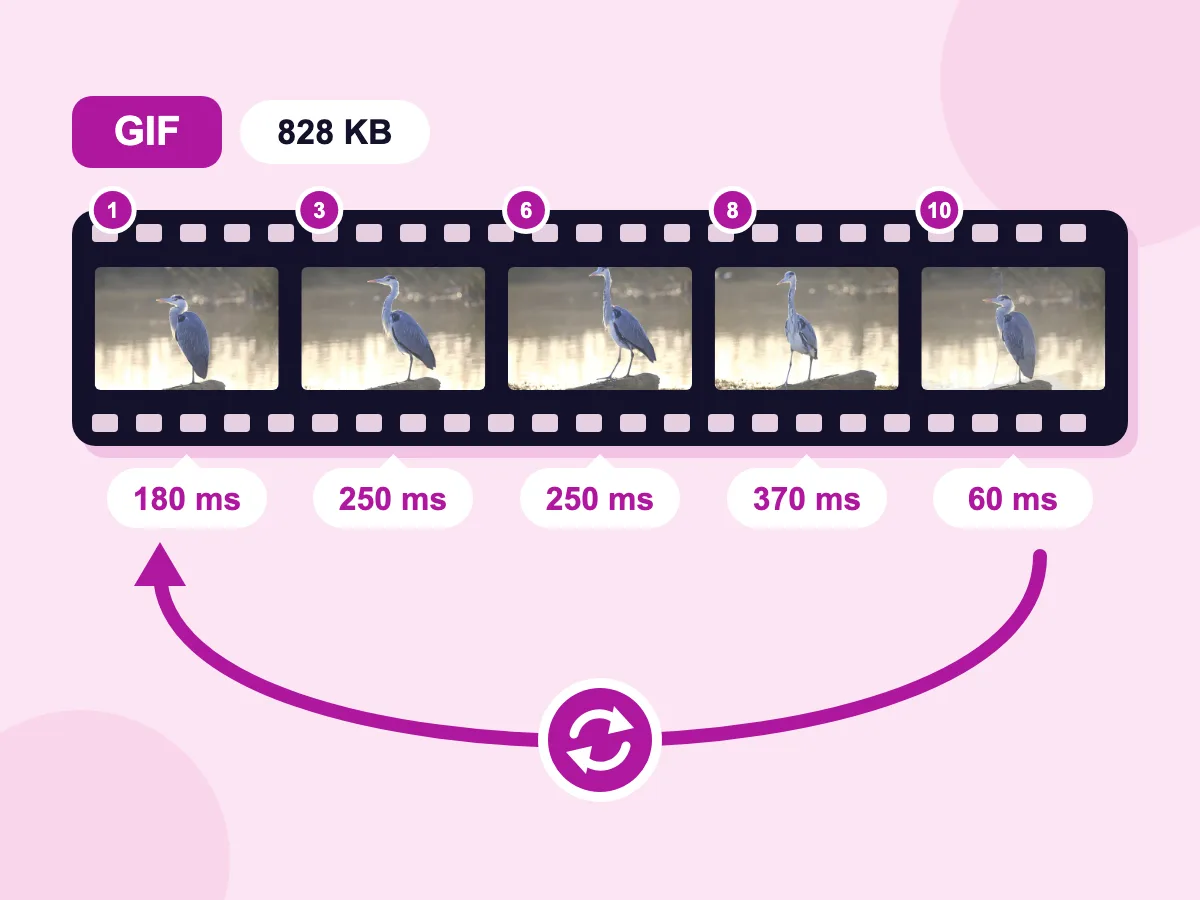
Keeps Frame Speed and Loops
Saved as GIF, each frame keeps its own delay, and the loop setting stays as it was. Our 10-frame heron GIF kept every delay, from 60 to 370 ms. At the default Quality of 75, it went from 1.8 MB to 828 KB.
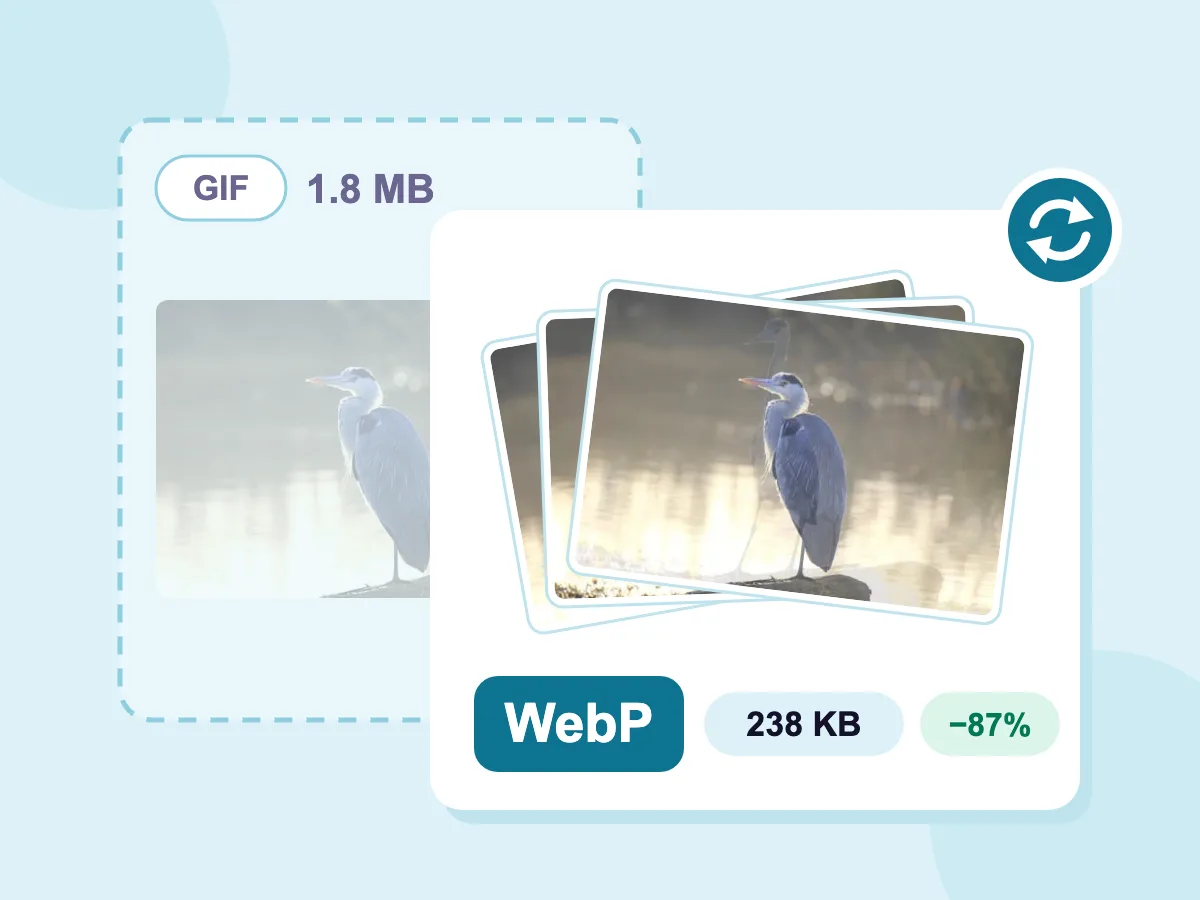
Save as Animated WebP
Set Save image as to WebP to get an animated WebP that loops forever. Only Quality applies on this path. Our heron GIF came out at 238 KB, 87% smaller than the 1.8 MB original.
- GIF Colors From 2 to 256
- Compress to a Target KB or MB
- Batch Compress to One ZIP
- Files Stay on Your Device
- Free, No Signup, No Watermark
What People Compress GIFs For
Websites and Docs
- Shrink a screen recording GIF before you add it to a help page
- Cap a banner GIF at 800 px with Max dimension
- Save an animation as WebP for a smaller file on your site
- Remove comments and extra data with Strip metadata
Discord, Slack and Chat
- Fit an animated emoji under Discord's 256 KB limit
- Bring a reaction GIF under 10 MB for a free Discord account
- Keep a Slack custom emoji under the suggested 128 KB
- Scale a meme down with Percentage before you post it
Email and Newsletters
- Bring a newsletter GIF under a set size in KB
- Scale a GIF to the width of your email layout, such as 600 px
- Cut the colors on a flat animated banner to 64 or 128
- Compress a batch of campaign GIFs into one ZIP
What Is GIF Compression?
GIF compression makes a GIF file smaller while keeping it a GIF. Every GIF already packs its pixels losslessly and uses at most 256 colors per frame. A GIF compressor goes further: it stores only what changes between frames, cuts colors and can allow tiny pixel errors. Resizing is different: it changes the width and height.
Free Online GIF Compressor: Reduce GIF Size Without Losing Quality
A GIF gets smaller in four ways: tighter packing, a lossy level, fewer colors or fewer pixels. The answers below show what each one costs, so you can stop before the animation looks worse.
Can You Compress a GIF Without Losing Quality?
Yes. Set Quality to 100 and leave GIF colors at 256, and no pixel changes. The file still shrinks, because each frame stores only the parts that differ from the frame before. The saving is smaller than with lossy settings. If the new file would be bigger and no target size is set, you get your original back.
Which GIF Settings Make the Biggest Difference?
Try them in this order, and check the result after each change:
- Resize: Max dimension or Percentage shrinks every frame. A GIF at half the width and height has a quarter as many pixels to store.
- Quality: it starts at 75. Lower numbers allow more speckled noise for a smaller file, and 100 adds none.
- GIF colors: 256 keeps the original palette. Lower numbers merge close colors, which can show bands in gradients and skin.
Does Compressing a GIF Keep the Animation?
Yes, if you save as GIF or WebP. Saved as GIF, it keeps its frame speed and its loop setting. Saving as JPG, PNG or BMP keeps a single frame, and the editor shows a warning when you pick one.
How Do You Make a GIF Smaller for Discord?
Type the limit in Target file size and pick KB or MB. For a GIF, the target lowers quality and colors but never the width and height, so resize too for small limits. Discord's common limits are:
- Emoji: 256 KB. Also set Max dimension to 128 px, since emoji show small.
- Stickers: 512 KB.
- Files in chat on a free account: 10 MB.
Should You Convert a GIF to WebP?
For a website, it can be. Set Save image as to WebP to save an animated WebP that loops forever, and check its size before you use it. Only Quality applies on that path. Keep GIF for email and apps that only take GIF, or use the GIF to WebP converter to resize while you convert.
More Free Tools
Other free tools for animations and image files, no signup needed.
GIF Compressor FAQ
Answers about lossy levels, colors, animation and file size limits.
How do I compress a GIF?
Compressing a GIF takes three steps. Drop your GIF files on the upload box, or browse for them. Set Quality, GIF colors or a Target file size, then press Compress. Check the percentage saved on each row and download. One file saves on its own, and two or more save as one ZIP.
Does the GIF compressor eliminate duplicate frames?
Yes, in effect. Each frame stores only the pixels that changed since the frame before. A frame that repeats the last one has nothing new, so it is usually removed and its display time is added to the frame before it. The animation plays at the same speed.
Is GIF lossy or lossless?
GIF is lossless: the file stores every pixel exactly as it was saved. The catch is the limit of 256 colors per frame, so a photo or video turned into a GIF loses colors at that step. Lossy GIF compression changes some pixels before saving, and the Quality setting here controls how much.
Is there a cost to use the GIF compressor?
No. There is no account, no watermark and no limit on how many GIFs you compress. Every setting is included: Quality, GIF colors, target size, resize, output format, Strip metadata and the filename suffix.
What is lossy GIF compression?
Lossy GIF compression lets small pixel errors into each frame so the data packs tighter. The file gets smaller, and at strong levels you may see speckles or streaks. Here, Quality sets the level. 100 adds no loss, 75 is the default, and lower numbers trade more detail for size.
How do I compress a GIF to 2MB or another exact size?
Type the size in Target file size and pick KB or MB. The tool tries your own settings first, then stronger lossy levels, then cuts the colors to 128 and 64. That is up to 6 tries, and it stops at the first one that fits. Target size never changes the width and height, so for a big drop also set Max dimension or Percentage. If no try fits, you get the smallest file it made.
Can you resize a GIF to make it smaller?
Yes. In the Resize section, Max dimension caps the longest side and leaves smaller GIFs as they are. Percentage scales every frame down by the amount you set. Both keep the shape of the GIF. Fewer pixels per frame often saves more than any other setting.
Can I compress multiple GIFs at once?
Yes. Add several GIFs and one set of settings covers them all. Each row shows its own saving, and two or more files download as picssizer_compressed.zip. For a long list, the bulk GIF compressor has the same controls.
Is there a file size limit for GIF compression?
No. There is no cap on file size and no limit on how many GIFs you add. Your own device does the work, so a long, large GIF takes longer and uses more memory on older phones.
How do I compress a GIF on my iPhone or Android?
Open this page in your phone's browser and tap to choose a GIF. The same editor opens, with the same settings. Press Compress, then download. There is no app to install.